Showing posts with label Google. Show all posts

Friday, November 18, 2011

Google Music - Set your music free (For USA Only)

Google announced now, Google user can purchase songs online and share their song on Android phones or Google Music Locker.


Google Music Locker

Google music locker is free Google Music account. You must set up your  Google Music Account before buying any music. User can create their Google music account at music.google.com or you can sign in to Google Music with your Gmail address. Now you can download and manage your music collection. Google also provide music manager software for your android mobile or tablet.
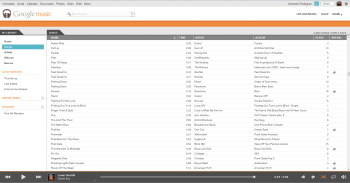
A sample Google Music Locker


Right now, Google sets limit to storing only 20,000 songs in your Google Music locker. Songs kept in your locker will be available to stream or download to all your devices and computers that use the same Gmail account.

Monday, June 20, 2011

How to Add Google Plus one (+1) Button to Website/Blogs


The Plus One (+1) button, Google’s new experiment, is shorthand for “this is pretty cool” or “you should check this out.”  By clicking Plus One (+1), you can to publicly give something your stamp of approval. Your vote can help friends, contacts, and others on the web find the best stuff when they search.
Plus One (+1) will be integrated directly into Google’s search engine, and will serve pretty much the same purpose as a Facebook ‘Like’ does. But it is not like face where you should go and and post your like or dislike. The Plus One (+1) button, you can keep on any website/blog. Here we explain implementation of Plus One (+1) button.
Implement Plus One (+1) button to your website
The implementation is very simple and you get started instantly by using this default code where you want the Google Plus One (+1) button to appear. You just  require to insert two line of codes to your HTML.
1. Insert the following javascript code to your <head> tag.
<script type= "text/javascript" src= "http://apis.google.com/js/plusone.js"></script>
2. Insert the following tag to the place where you want the button to appear.
<g:plusone> </g:plusone>

Friday, June 17, 2011

Google Search by Image

Google announced a new feature which will allow users to search the internet using images found both on their computer or online. Google uses computer vision techniques to match your image to other images in the Google Images index and additional image collections. From those matches, we try to generate an accurate “best guess” text description of your image, as well as find other images that have the same content as your search image. Your search results page can show results for that text description as well as related images. 

Steps For Search By Image (Work with firefox and crome only)  :
1) Visit web site : http://images.google.com/